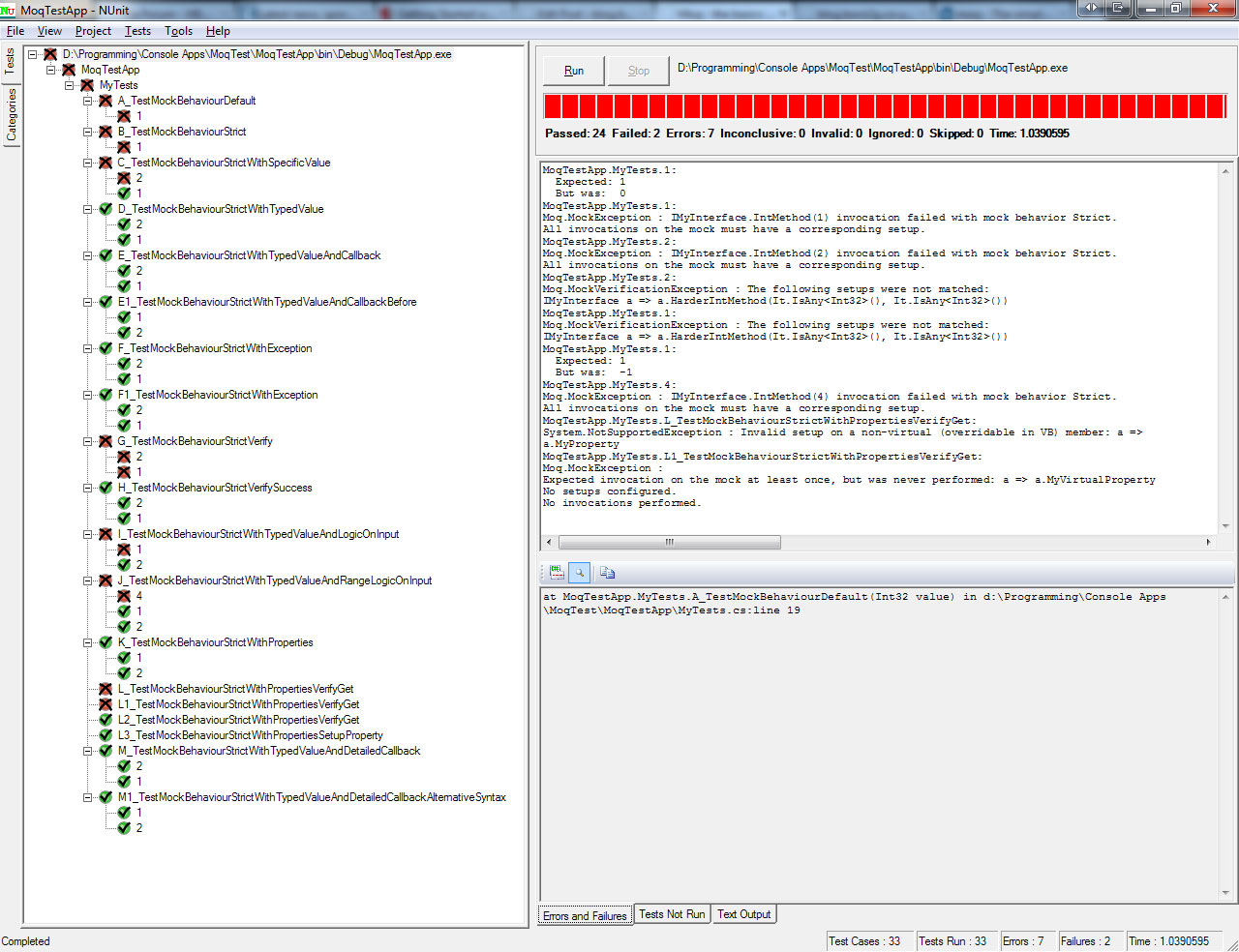
[TestFixture]
public class MyTests
{
[Test]
[TestCase(1, TestName = "1")]
public void A_TestMockBehaviourDefault(int value)
{
Mock<IMyInterface> myInterface = new Mock<IMyInterface>();
int result = myInterface.Object.IntMethod(value);
//we havent setup mock for value = 1
Assert.AreEqual(value, result);
myInterface.Verify();
}
[Test]
[TestCase(1, TestName = "1")]
public void B_TestMockBehaviourStrict(int value)
{
Mock<IMyInterface> myInterface = new Mock<IMyInterface>(MockBehavior.Strict);
int result = myInterface.Object.IntMethod(value);
//now in strict mode
//again, we havent setup mock for value = 1
Assert.AreEqual(value, result);
myInterface.Verify();
}
[Test]
[TestCase(1, TestName = "1")]
[TestCase(2, TestName = "2")]
public void C_TestMockBehaviourStrictWithSpecificValue(int value)
{
Mock<IMyInterface> myInterface = new Mock<IMyInterface>(MockBehavior.Strict);
myInterface.Setup(a => a.IntMethod(1)).Returns(1);
int result = myInterface.Object.IntMethod(value);
//we have setup the mock for value = 1 but not value = 2
Assert.AreEqual(value, result);
myInterface.Verify();
}
[Test]
[TestCase(1, TestName = "1")]
[TestCase(2, TestName = "2")]
public void D_TestMockBehaviourStrictWithTypedValue(int value)
{
Mock<IMyInterface> myInterface = new Mock<IMyInterface>(MockBehavior.Strict);
myInterface.Setup(a => a.IntMethod(It.IsAny<int>())).Returns((int a) => a);
int result = myInterface.Object.IntMethod(value);
//any int will pass
Assert.AreEqual(value, result);
myInterface.Verify();
}
private int _count = 0;
[Test]
[TestCase(1, TestName = "1")]
[TestCase(2, TestName = "2")]
public void E_TestMockBehaviourStrictWithTypedValueAndCallback(int value)
{
Mock<IMyInterface> myInterface = new Mock<IMyInterface>(MockBehavior.Strict);
myInterface.Setup(a => a.IntMethod(It.IsAny<int>())).Returns((int a) => a).Callback(() => _count++);
int result = myInterface.Object.IntMethod(value);
//we can log callbacks before or after the Returns call
Console.WriteLine(String.Format("Called E_TestMockBehaviourStrictWithTypedValueAndCallback {0} times", _count));
Assert.AreEqual(value, result);
myInterface.Verify();
}
[Test]
[TestCase(1, TestName = "1")]
[TestCase(2, TestName = "2")]
public void E1_TestMockBehaviourStrictWithTypedValueAndCallbackBefore(int value)
{
Mock<IMyInterface> myInterface = new Mock<IMyInterface>(MockBehavior.Strict);
//callbacks can happen before and after the Returns call
myInterface.Setup(a => a.IntMethod(It.IsAny<int>())).Callback(() => Console.WriteLine("before")).Returns((int a) => a).Callback(() => Console.WriteLine("after"));
int result = myInterface.Object.IntMethod(value);
Assert.AreEqual(value, result);
myInterface.Verify();
}
[Test]
[TestCase(1, TestName = "1")]
[TestCase(2, TestName = "2")]
[ExpectedException(typeof(Exception))]
public void F_TestMockBehaviourStrictWithException(int value)
{
Mock<IMyInterface> myInterface = new Mock<IMyInterface>(MockBehavior.Strict);
//this can throw specific exceptions if we want
//catching at a test level is a bit loose since other code could exception - see F1 for alternative
myInterface.Setup(a => a.IntMethod(It.IsAny<int>())).Throws<Exception>();
int result = myInterface.Object.IntMethod(value);
myInterface.Verify();
}
[Test]
[TestCase(1, TestName = "1")]
[TestCase(2, TestName = "2")]
public void F1_TestMockBehaviourStrictWithException(int value)
{
Mock<IMyInterface> myInterface = new Mock<IMyInterface>(MockBehavior.Strict);
//this can throw specific exceptions if we want
myInterface.Setup(a => a.IntMethod(It.IsAny<int>())).Throws<Exception>();
//here we can catch specific exceptions
Assert.Throws<Exception>(() => myInterface.Object.IntMethod(value));
myInterface.Verify();
}
[Test]
[TestCase(1, TestName = "1")]
[TestCase(2, TestName = "2")]
public void G_TestMockBehaviourStrictVerify(int value)
{
Mock<IMyInterface> myInterface = new Mock<IMyInterface>(MockBehavior.Strict);
myInterface.Setup(a => a.IntMethod(It.IsAny<int>())).Returns((int a) => a).Verifiable();
myInterface.Setup(a => a.HarderIntMethod(It.IsAny<int>(), (It.IsAny<int>()))).Returns((int a, int b) => a).Verifiable();
int result = myInterface.Object.IntMethod(value);
//we havent called HarderIntMethod
myInterface.Verify();
}
[Test]
[TestCase(1, TestName = "1")]
[TestCase(2, TestName = "2")]
public void H_TestMockBehaviourStrictVerifySuccess(int value)
{
Mock<IMyInterface> myInterface = new Mock<IMyInterface>(MockBehavior.Strict);
myInterface.Setup(a => a.IntMethod(It.IsAny<int>())).Returns((int a) => a).Verifiable();
myInterface.Setup(a => a.HarderIntMethod(It.IsAny<int>(), It.IsAny<int>())).Returns((int a, int b) => a).Verifiable();
int result = myInterface.Object.IntMethod(value);
int anotherResult = myInterface.Object.HarderIntMethod(value, value);
myInterface.Verify();
}
[Test]
[TestCase(1, TestName = "1")]
[TestCase(2, TestName = "2")]
public void I_TestMockBehaviourStrictWithTypedValueAndLogicOnInput(int value)
{
Mock<IMyInterface> myInterface = new Mock<IMyInterface>(MockBehavior.Strict);
//setup can perform logic based on input to determine return value(s)
myInterface.Setup(a => a.IntMethod(It.Is<int>(b => b % 2 == 0))).Returns((int a) => a);
myInterface.Setup(a => a.IntMethod(It.Is<int>(b => b % 2 != 0))).Returns((int a) => -a);
int result = myInterface.Object.IntMethod(value);
Assert.AreEqual(value, result);
myInterface.Verify();
}
[Test]
[TestCase(1, TestName = "1")]
[TestCase(2, TestName = "2")]
[TestCase(4, TestName = "4")]
public void J_TestMockBehaviourStrictWithTypedValueAndRangeLogicOnInput(int value)
{
Mock<IMyInterface> myInterface = new Mock<IMyInterface>(MockBehavior.Strict);
//rather than specific logic, instead we can make use of Ranges
myInterface.Setup(a => a.IntMethod(It.IsInRange<int>(0,3, Range.Inclusive))).Returns((int a) => a);
int result = myInterface.Object.IntMethod(value);
Assert.AreEqual(value, result);
//we haven't setup a return value for 4
myInterface.Verify();
}
[Test]
[TestCase(1, TestName = "1")]
[TestCase(2, TestName = "2")]
public void K_TestMockBehaviourStrictWithProperties(int value)
{
Mock<IMyInterface> myInterface = new Mock<IMyInterface>(MockBehavior.Strict);
//we can manipulate objects being returned
myInterface.Setup(a => a.MyObjectMethod(value)).Returns((int a) => new MyObject() { MyProperty = a.ToString() });
MyObject result = myInterface.Object.MyObjectMethod(value);
Assert.AreEqual(value.ToString(), result.MyProperty);
myInterface.Verify();
}
[Test]
public void L_TestMockBehaviourStrictWithPropertiesVerifyGet()
{
Mock<MyObject> myObject = new Mock<MyObject>(MockBehavior.Strict);
//this is where you need virtual properties
myObject.Setup(a => a.MyProperty).Returns("blah");
myObject.Verify();
myObject.VerifyGet(a => a.MyProperty);
}
[Test]
public void L1_TestMockBehaviourStrictWithPropertiesVerifyGet()
{
Mock<MyObject> myObject = new Mock<MyObject>(MockBehavior.Strict);
myObject.Setup(a => a.MyVirtualProperty).Returns("blah");
myObject.Verify();
//we have never accessed MyVirtualProperty hence the VerifyGet fails
myObject.VerifyGet(a => a.MyVirtualProperty);
}
[Test]
public void L2_TestMockBehaviourStrictWithPropertiesVerifyGet()
{
Mock<MyObject> myObject = new Mock<MyObject>(MockBehavior.Strict);
myObject.Setup(a => a.MyVirtualProperty).Returns("blah");
Assert.IsNotEmpty(myObject.Object.MyVirtualProperty);
myObject.Verify();
//we have accessed both properties
myObject.VerifyGet(a => a.MyVirtualProperty);
}
[Test]
public void L3_TestMockBehaviourStrictWithPropertiesSetupProperty()
{
Mock<MyObject> myObject = new Mock<MyObject>(MockBehavior.Strict);
//rather than setup and then adding Returns method, SetupProperty achieves the same thing
myObject.SetupProperty(a => a.MyVirtualProperty, "blah");
Assert.IsNotEmpty(myObject.Object.MyVirtualProperty);
myObject.Verify();
myObject.VerifyGet(a => a.MyVirtualProperty);
}
[Test]
[TestCase(1, TestName = "1")]
[TestCase(2, TestName = "2")]
public void M_TestMockBehaviourStrictWithTypedValueAndDetailedCallback(int value)
{
Mock<IMyInterface> myInterface = new Mock<IMyInterface>(MockBehavior.Strict);
//Callback and Returns can both deal with multiple parameters via Generics or parameters.
// M1 shows the opposite of each
myInterface.Setup(a => a.HarderIntMethod(It.IsAny<int>(), It.IsAny<int>()))
.Returns((int a, int b) => a)
.Callback<int, int>((a, b) => Console.WriteLine("A is " + a + " B is " + b));
int result = myInterface.Object.HarderIntMethod(value, value + 1);
Assert.AreEqual(value, result);
myInterface.Verify();
}
[Test]
[TestCase(1, TestName = "1")]
[TestCase(2, TestName = "2")]
public void M1_TestMockBehaviourStrictWithTypedValueAndDetailedCallbackAlternativeSyntax(int value)
{
Mock<IMyInterface> myInterface = new Mock<IMyInterface>(MockBehavior.Strict);
//demonstrates the opposite of M in terms of the syntax required into Callback and Returns
myInterface.Setup(a => a.HarderIntMethod(It.IsAny<int>(), It.IsAny<int>()))
.Returns<int , int>((a, b) => a)
.Callback((int a, int b) => Console.WriteLine("A is " + a + " B is " + b));
int result = myInterface.Object.HarderIntMethod(value, value + 1);
Assert.AreEqual(value, result);
myInterface.Verify();
}
}