blog.boro2g.co.uk Some ideas about ASP.Net & Sitecore
  • scissors
    February 23rd, 2012boroSitecore

    Under the hood the Sitecore api offers huge amounts of functionality. When you are using the cms environment, chances are you are triggering this functionality via sitecore commands.

    Most buttons in the cms are tied into these commands so how do you pair up specific buttons to specific code?

    There is an excellent Firefox plugin – Firebug, which is essential if you do a lot of web development. If you haven’t ever used this, download it now!

    Once installed, run through the following steps:

    1. Fire-up your cms environment inFirefox (once firebug is installed)
    2. Activate firebug and select ‘inspect element’ – then click the button you are interested in
    3. Check the firebug window for the JavaScript attached to the button click – this should be wrapped in a sitecore form post JavaScript method eg javascript:return scForm.postEvent(this,event,’item:setdisplayname’)
    4. Open /app_config/commands.config and search for the command name. Examples of this are: item:setdisplayname, item:publish
    5. Find the assembly referenced in the commands file and fire up your favourite decompiler eg reflector or ilspy and search for eg <command name=”item:setdisplayname” type=”Sitecore.Shell.Framework.Commands.SetDisplayName,Sitecore.Kernel” />

    You should now have a route into the source code for each button in the cms!
  • scissors
    February 14th, 2012boroSitecore

    If you have ever developed with Sitecore, chances are you will have deployed content via Sitecore Packages.

    A sitecore package is essentially a zip file containing the xml to be stored in the sitecore databases along with any files you choose to deploy. Some upgrades make use of *.update files – this is out the scope of this post.

    When you install content from packages, items should have the same guid. If conflicts are found during an install you are presented with several options. One word of caution – if you choose overwrite, its pretty easy to blow away large chunks of the tree if you package only contains a few items.

    If you want to see what is in a package you have a few options:

    1. Drill into the zip file with your favourite zip program – content items are nested by database and then path
    2. Load the package into the Sitecore Package Designer (I wish I knew about this one sooner!!!!!)

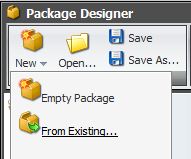
    For the second option, there is a hidden button (why this is hidden I dont know!) in the package designer:

    When you click ‘From Existing’ you are shown the contents of your data -> packages folder. If you have been sent the package, copy it to this folder.

    Once the package is selected you should see items in the package designer as if you had created the package yourself. From here you can then save the xml definition as per normal.

  • scissors
    February 8th, 2012boroSitecore

    Consider the following scenario: you setup a new Sitecore template (or branch) which you want to add anywhere in the tree without setting any sitecore insert options

    The reason you may want to do this is you have several templates in place throughout the tree, if the insert options can’t be inherited then you would need to update a lot of standard values!

    If you dont use the rule engine for this (see this post) you can still achieve the same solution.

    In the following example, we want the user to be able to add a Generic Form anywhere under the home node of the site.

    using System;
    using System.Linq;
    using ###.DataSource.Cms;
    using Sitecore.Data;
    using Sitecore.Pipelines.GetMasters;
    
    namespace ###.Domain.Cms.Specialization.Processors.GetMasters
    {
        /// <summary>
        /// Allow content editor to add a generic form anywhere under the home node
        /// </summary>
        public class GetGenericForm
        {
            public void Process(GetMastersArgs args)
            {
                if (args.Item.ID.Guid == ItemKeys.Home || args.Item.Axes.GetAncestors().Any(a => a.ID.Guid == ItemKeys.Home))
                {
                    args.Masters.Add(Sitecore.Context.ContentDatabase.GetItem(new ID(TemplateKeys.GenericForm)));
                }
            }
        }
    }

    Which then needs patching into the uiGetMasters pipeline (/App_Config/Include):

    <configuration xmlns:patch="http://www.sitecore.net/xmlconfig/">
        <sitecore>
        <processors>
          <uiGetMasters>
            <processor
              patch:after="processor[@type='Sitecore.Pipelines.GetMasters.RunRules, Sitecore.Kernel']"
              type="###.Domain.Cms.Specialization.Processors.GetMasters.GetGenericForm, ###.Domain.Cms" />
          </uiGetMasters>
        </processors>
        </sitecore>
    </configuration>

    After the talk at the Bristol Sitecore User Group yesterday, Raul demonstrated the rule engine for this kind of thing – the exact same problem can be solved without any code :)

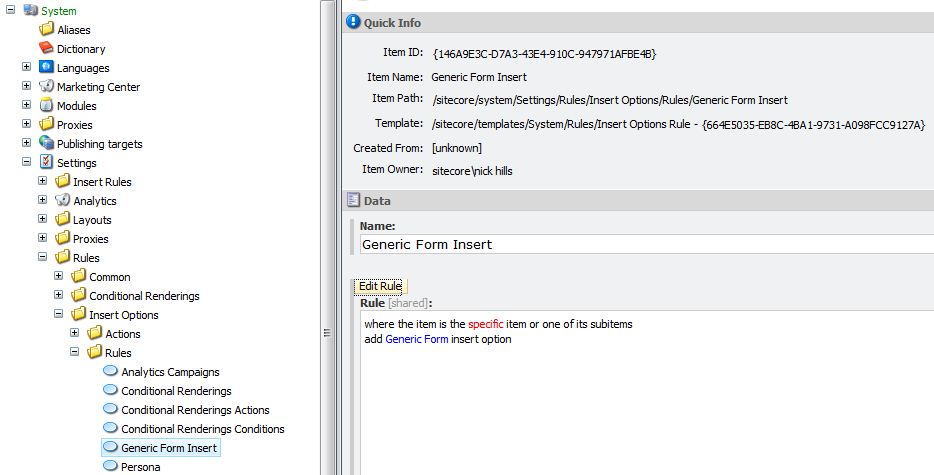
    You need to set yourself up a rule eg:

    Note, one step remains – you need to select the root item.