A quick tip for checking data flowing through the Sitecore pipelines is to setup empty processors and then move them sequentially through the required pipeline.
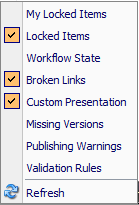
Sitecore gutters are a great way of seeing quick summaries of content within the tree. Some existing gutter options include Locked Items, Workflow State, Missing Versions and more. These can be toggled by right clicking in the left column of the content editor.
Its easy to build custom gutters – in the example above we have a new item available – ‘Custom Presentation’. When this is active on an item it shows:
Behind the scenes there is very little code to achieve this:
1
2
3
4
5
6
7
8
9
10
11
12
13
14
15
16
17
18
19
20
21
22
23
24
25
26
27
28
29
30
31
32
33
34
35
36
37
38
39
40
41
42
43
44
using System;
using System.Linq;
using###.DataSource.Cms;
using Sitecore;
using Sitecore.Data.Fields;
using Sitecore.Data.Items;
using Sitecore.Diagnostics;
using Sitecore.Globalization;
using Sitecore.Shell.Applications.ContentEditor.Gutters;
One of Sitecore’s most useful features is the plug-ability of functionality via the configuration factory. Its very easy to add or update custom implementations where necessary.
A typical programming model used throughout this is the Provider model – Membership, Roles, Item, Proxy… the list is endless. Unfortunately one provider thats not exposed in the config factory is the MediaProvider.
No problem, thanks to some help from support they suggested a way to get around this, you can tap into the initialise pipeline. Here is the patch file to enable this: